
Language: NO NorskEN English
For PE teachers, sports teachers, coaches and activity leaders in schools and sport
Language: NO NorskEN English

Planning and assessment in PE and sport

An app for teachers, coaches and activity leaders. After the lesson, you record attendance and attainment for each student, and from that Krifak drafts the term report. The app does not tell you how to teach, but shows what to look for in your students in each topic.

193ready-made topics
28sports and activities

Coming soon to the App Store and Google Play. Student data stays on your phone. Setup is free. In Norway, the subscription costs NOK 49 a month or NOK 399 a year.

What you look for

When you’re a PE or sports teacher in a cramped gym with 30 students, Krifak can help you focus on what to look for in each student: skills, effort and knowledge. The app gives you an anchor in the chaos of a busy PE lesson. After the lesson you mark each student on a line with five levels from low to highest, with no numbers.

Football – receiving Skills and mastery
  • Looks up and around before the ball arrives
  • Takes a couple of quick steps towards the ball and is balanced when it arrives
  • Cushions the ball with the foot, thigh or chest by drawing that part of the body back slightly
  • Has control after one touch and can play the ball on without hesitating
Feedback in the topic

You are ready and have a go every time you get the ball, and that pays off. Take a couple of steps towards the ball and stop it with the inside of your foot.

You sometimes get the ball to stop close to you, especially when it comes along the ground. Draw your foot back slightly as the ball hits it, and it will not bounce so far away from you.

You bring the ball down calmly, even when it comes high or hard. Because you have looked around beforehand, you are quick to move on with it.

Drag the marker, or tap anywhere on the line. This is how it works in the app.

The term report is based on what you have recorded

Each lesson you record adds to the evidence: attendance, attainment, the lesson topic and your notes. From this, Krifak drafts a letter to the student. You read it through, change whatever you like and share it when you are happy with it.

Each mark is a recorded lesson in a fictional class with two lessons a week.

The school year

The first half of the school year, from the start of term in August to the term report in January.

09:41
Tue 1 Sept
Physical education
Lesson topic
Football – receiving
What you look for
Effort and cooperation
  • Makes themselves available and shows with body and voice that they are ready for the ball
  • Tries again just as keenly when the ball bounces away
  • Plays the ball back to their partner so it is easy to receive
Skills and mastery
  • Looks up and around before the ball arrives
  • Takes a couple of quick steps towards the ball and is balanced when it arrives
  • Cushions the ball with the foot, thigh or chest by drawing that part of the body back slightly
  • Has control after one touch and can play the ball on without hesitating
Knowledge
  • Understands that a calm first touch gives more time and more options
  • Knows which part of the body suits low, mid-height and high balls
Set for all
Effort and cooperationMedium plus
Skills and masteryMedium
KnowledgeMedium
Anna
Effort and cooperation
Medium plus
Skills and mastery
Medium
Knowledge
Medium
Benjamin
Effort and cooperation
Medium plus
Skills and mastery
High
Knowledge
Medium
Cecilie
Effort and cooperation
High
Skills and mastery
Medium
Knowledge
Medium
David
Effort and cooperation
Medium plus
Skills and mastery
Medium
Knowledge
Medium

  1. 01Week 33 · Monday 10 August

    Setup

    Five steps: your name and whether you teach lower or upper secondary, your first class with a criteria set, students, regular lesson times and, finally, an app lock if you want one.

    The built-in criteria sets for PE, elite sport, sports for all and physical activity and health are written for Krifak and based on the competence aims in the Norwegian curriculum. For other subjects, you create your own set.

    You can take a photo of the class list, whether it is on paper or on a screen. Text recognition happens on the phone, and “First names only” is on by default.

    Setup is free
  2. 02Week 35 · Monday 24 August

    Topic plan

    In the topic plan, you add the topics for the school year with start and end dates. “Football – receiving” is one of 193 ready-made topics. You can use it as it is, change it or make your own.

    The topic plan can be copied to other classes.

    For a lesson, you can make a lesson plan with topic, location, equipment and notes, and get a reminder before it starts. A lesson plan can be saved as a template.

  3. 03Week 36 · Tuesday 1 September

    After the lesson

    You set a status for each student: present, late, absent or not participating. Then you mark attainment against the class’s criteria. The topic comes from the topic plan, and what to look for is shown at the top.

    “Set for all” gives the whole class the same level, and then you adjust the exceptions.

    ← ↓ Drag the markers and tap the statuses on the screen.

  4. 04Week 39 · Wednesday 23 September

    Student picker and teams

    The student picker sits inside each class and doesn’t pick anyone twice until everyone has had a turn.

    The class can be split into 2 to 10 teams, balanced or random.

    Balanced teams take skills, gender and activity background into account. If you make teams from a recorded lesson, only students marked present are included. From the teams you can start a tournament.

  5. 05Week 40 · Friday 2 October

    Your week

    Home shows your week based on your timetable, with the days side by side and the lessons you have recorded. If you forget to record a lesson, you can record it later from Home.

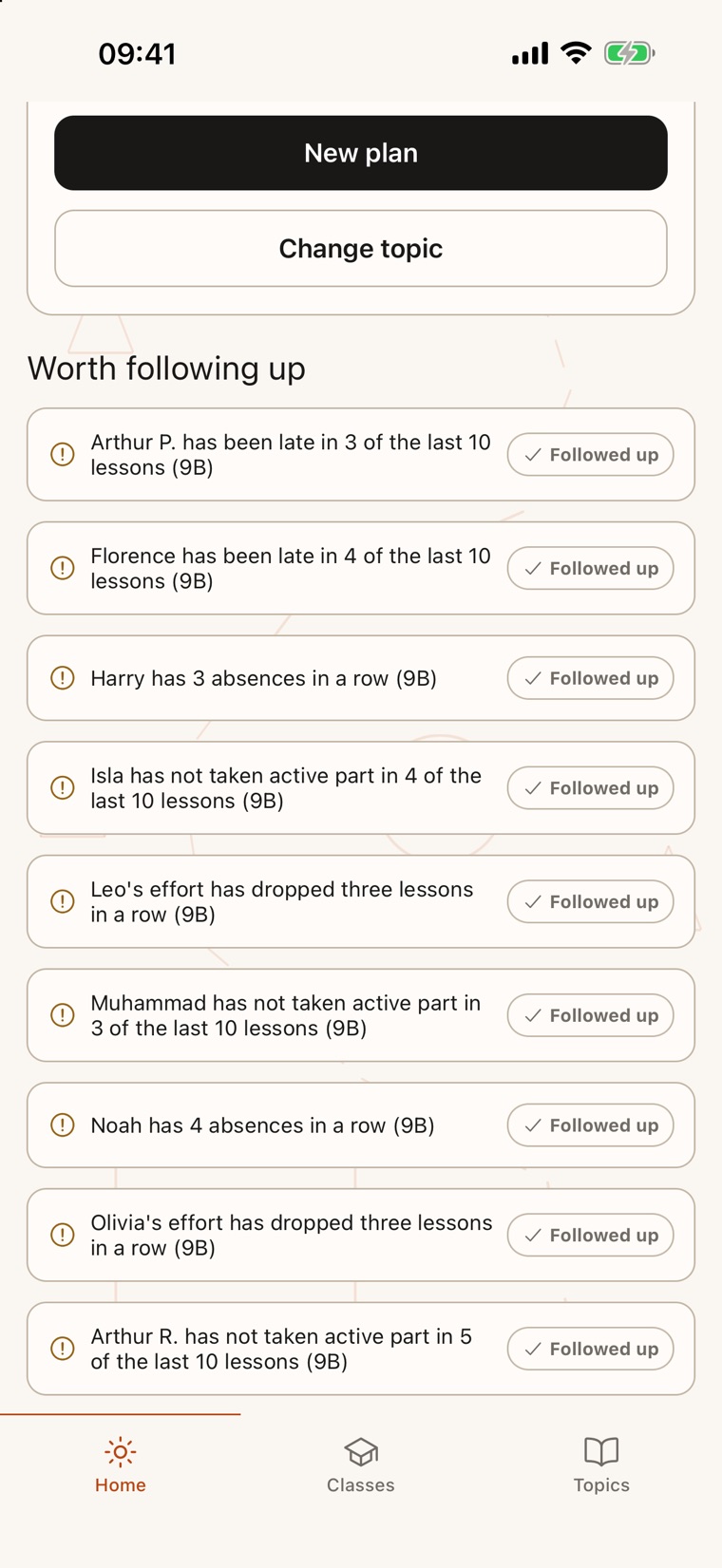
    Under “Worth following up” you see students who have been absent several times in a row, who often don’t take part or arrive late, or whose effort is dropping.

    Light or dark theme
  6. 06Week 43 · Thursday 22 October

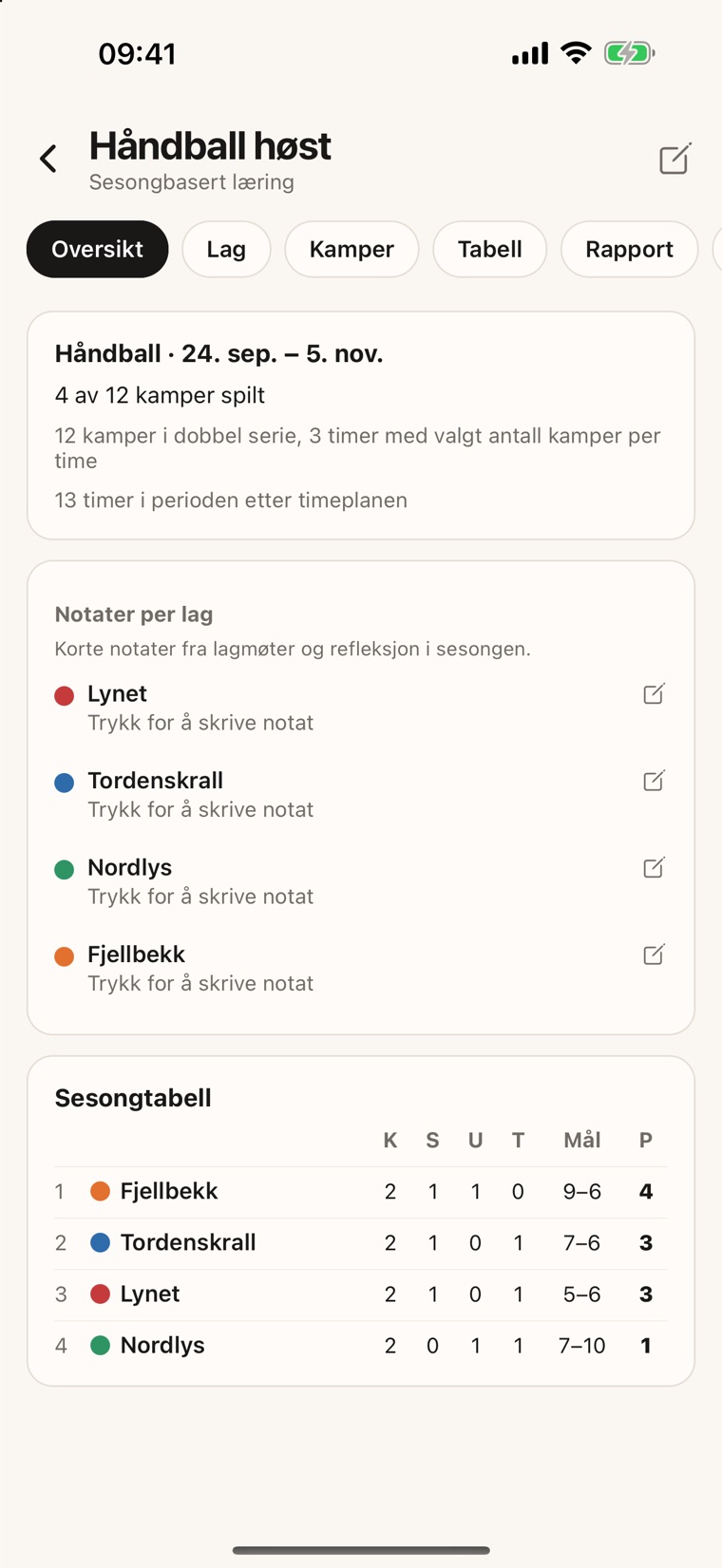
    Season-based learning

    Fixed teams over several weeks, with roles, matches, a season table and a fair play table.

    Fair play points count towards effort and cooperation for the students on the team who were present. League points do not count towards the assessment.

  7. 07Week 50 · Monday 7 December

    Student page

    Everything about one student in one place: attendance, average per criterion on the line, progress month by month, topics, goals, theory grades and fitness tests.

    Progress is shown in words, such as “Up since Aug”, not in numbers. You can view the whole year, the autumn term or the spring term.

  8. 08Week 2 · Monday 11 January

    Term report

    The average is shown as a marker on the line for each criterion. You can drag the marker to adjust it, and “Back to the average” undoes the change.

    Below is the draft letter. Knowledge is only included when you switch it on.

Worth following up

At the bottom of Home in School, you see students who have been absent from the last three lessons in a row. You also see students who have been late in at least 3 of the last 10 lessons, and students who have not taken active part in at least 3 of them. The same goes for students whose effort has dropped three lessons in a row and is now low.

Tap a student to open their student page. With “Followed up” you can write down what you did, and the follow-up stays on the student page with the date. Both are included in the subscription.

Worth following up at the bottom of Home in School: nine fictional students in 9B with absences in a row, late arrivals, little active participation or dropping effort, each with the Followed up button.
Fictional students in class 9B.

The letter to the student

The term report is a short letter to the student, written in full sentences and in language that students aged 13 to 19 understand. Attainment is described in words, not numbers.

The letter is assembled from pre-written texts based on what you have recorded. The attainment level decides which sentences are used, and the tone is adapted to lower secondary (years 8 to 10), upper secondary, sports for all and elite sport. Classmates get different wording, and the assessment itself is no more than 220 words.

One paragraph is about a specific activity, taken from the lesson in which the student was rated highest. You choose which notes are included.

You can edit everything before you tap “Share / copy text” or “Share as PDF”. The PDF also includes the progress chart. Nothing is sent from the app.

Hi Frida,

Thank you for helping to create a good sense of community in our lessons. Here is my feedback on your work in PE this term. Please read it before our conversation.

My impression is that you give your all in lessons and go the distance in many different activities. In effort and cooperation, you are very good and show a high level of competence.

Your skills show good competence. The next step for you could be to change your approach more quickly when the situation in the game shifts. Going forward, I would like you to practise more on your own towards your goals.

In one lesson, you showed a high level in the role of first defender in football. You sometimes do very well, but not consistently enough yet. Slow down over the last few metres, and you will be harder to get past. Play one-on-one in a narrow channel and try to push the attacker towards one side.

Knowledge

You can explain technique, rules and the game in the activities we have worked on, and you use what you know with confidence. Your knowledge is very good and shows a high level of competence.

I look forward to continuing to follow your progress next term.

The letter the app writes for Frida, a fictional student in her first year of upper secondary, based on what was recorded for her this autumn, with the Knowledge section switched on. Other students get different wording. This is how the letter reads when the app is set to English.

The topic library

193 ready-made topics in 28 sports and activities. Each topic covers one skill, listing what to look for in skills, in effort and cooperation, and in knowledge. You also get short feedback for high, medium and low attainment, and a piece of advice.

Use the topics as they are, change them or make your own. You can also add topics to earlier lessons in one go.

Ball gamesBasketball, football, handball, floorball, dodgeball, tchoukball, ultimate, volleyball69
Gymnastics, coordination and parkour21
Strength and fitness20
Outdoor educationOutdoor education, orienteering18
Racket sportsBadminton, pickleball13
Dance13
Martial arts9
GamesGames, cooperative games9
Endurance, power and speed9
Health7
Roles and fair play4
Yoga1

12 categories, 193 topics.

Football has 17 skills

They include the inside-foot pass, receiving, shooting, feints, first defender, high press and the counter-attack.

Season-based learning

Fixed teams, roles and matches through a whole season. The class is split into 2 to 8 teams that stay together for several weeks, in a team game such as football, handball, volleyball or ultimate frisbee. Each team gets a name, a colour and a motto.

Everyone is a player, and the students get roles in the team. You assess the roles as low, medium or high, and fair play gives the team 0 to 3 points each lesson. Both count in the assessment of the students. The league points do not.

Matches are set up as a single or double round robin, with a league table and a fair play table, and matches that are not played move to the next lesson. At the end you share the season report as text and can print a season evaluation with eight questions for the students.

  1. Pre-season2 lessons, no matches
  2. Season and matches3 lessons
  3. Reflection and wrap-up1 lesson

The phases with their default length. You can change it, and the lessons are taken from the timetable.

  • Captain
  • Coach
  • Referee
  • Warm-up leader
  • Fair play leader
  • Equipment manager
  • Statistician
  • Journalist/media manager
  • Up to three roles of your own

The roles you can choose from. A student can have more than one.

The carousels

For years 1–⁠7, School has four carousels under Team games: football, handball, basketball and volleyball. A carousel is circuit training with seven fixed stations set up at the same time, and the students move round in groups of four to six.

Choose the year group, how many students there are and how long the session is. The carousel then shows the groups, how many stations you need and how many minutes you spend at each. Tap a station for the animation, the task, what the group counts and how it gets easier or harder.

In an ordinary gym of about 24 × 12 metres, the basketball and volleyball carousels fit with four stations at a time, set A and set B, for at most 24 students. With “Share” you get the station list as text, for example to print and put at each station.

  1. The ArcShooting
  2. The Tower CraneStrength
  3. In TimePair exercise
  4. Right and LeftTechnique
  5. Basket MatchTwo against two
  6. The Bus StopReceiving
  7. The TilesCoordination

The basketball carousel is made for a hall with two baskets. The numbers show the order the groups move in.

Student data stays on your phone

Student data and assessments are stored only on your phone. You don’t need an account, and nothing is synced to a server. Krifak sends no student data. The app has no ads or tracking and does not measure how you use it.

Backup
An encrypted file protected by a password you choose, at least eight characters long. Without the password, the file cannot be opened, not even by us. The app reminds you to back up after 30 days. If you have turned on backup of your whole phone in iCloud or with Google, the app’s data may be included there, as for other apps.
App lock
Face ID, fingerprint or a four-digit PIN.
Clean-up
Lessons and lesson plans older than one year are deleted automatically. If you delete a class, its reminders and calendar events are deleted too.
Subscription
The subscription is handled by Apple and Google. RevenueCat verifies the subscription and never receives student data.

Pricing

You can set up classes, students, your timetable and assessment criteria without a subscription. In Norway, the rest of the app costs NOK 49 a month or NOK 399 a year. In other countries, the App Store shows the price in your local currency.

49NOKper month
or
399NOKper year

Without a subscription

  • Your week on Home
  • Classes and the class page
  • Students: add, import and edit
  • Timetable and assessment criteria
  • Settings, including backup
  • User manual
  • Activity list for years 1–⁠7, with search and filters

With a subscription

  • Recording lessons
  • Student page, notes about students and term report
  • Theory grades and goals
  • Teams, tournaments and standings
  • Fitness tests, topic plan and lesson plans
  • Self-assessment and season-based learning
  • Topics, the student picker and your own criteria sets
  • The activities and carousels for years 1–⁠7

Cancelling deletes nothing.

Coach Helper is the part of Krifak for anyone who coaches children aged 5 to 10: a calendar for your training, 114 activities with animated sketches in football, handball, basketball and volleyball, a training plan for your team and a coach guide for new coaches. Everything in Coach Helper is available in Norwegian, English and Swedish. One subscription covers both School and Coach Helper. Read about Coach Helper

Who is behind it

Krifak is developed together with a PE teacher with a background in sports science and education. The direction of the content and features comes from him.

  • Bachelor’s degree in sport and physical education
  • Master’s degree in sport science, with a thesis on player development in football
  • Teacher training (PPU, the Norwegian postgraduate teaching qualification)
  • UEFA B coaching licence in football

Krifak is provided by OLMO AS, a limited company in Norway, reg. no. 938 813 876. Two people run Krifak, and the company never receives student data. You can send questions about the app to kontakt@krifak.no.

Packages for schools, sports clubs and municipalities

Schools, sports clubs and municipalities can ask for an agreement covering several teachers or coaches. Tell us a little about yourselves in the form, and we will reply by email.

If you want to use the app yourself, you can join the waitlist further down.

Thank you. We have received your enquiry and will reply by email.

What kind of organisation?

Nine digits. Leave the field empty if your organisation is outside Norway or if you are unsure.

Who will use Krifak?

OLMO AS, which provides Krifak, uses the details only to reply to your enquiry and, if relevant, to make an agreement with you. They are stored in a database in the EU, and we receive a copy in our inbox at Google (Gmail). Only the two people who run Krifak read them. Everything is deleted at the latest 12 months after the enquiry was last changed. Privacy Policy

For data protection officers and school leaders: Information for schools (in Norwegian)

Krifak

For PE teachers, sports teachers, coaches and activity leaders in schools and sport

Coming soon to the App Store and Google Play

Get notified when the app is out

Leave your email address, and we will let you know when Krifak is in the App Store and Google Play.

Thank you. We will let you know when Krifak is in the App Store and Google Play.

What would you like to use?

OLMO AS, which provides Krifak, stores your email address, your choice, the language of the page, which consent text you accepted and when you signed up, in a database in the EU. Everything is deleted once we have let you know, and at the latest 12 months after you signed up. To be deleted sooner, write to venteliste@krifak.no. Privacy Policy

Packages for schools, sports clubs and municipalities

kontakt@krifak.no